

DataManagers Creation
By convention, the DataManager is located in the Logic/DM folder and is named {ModelName}DM. In this section, we will create our first DataManager (DM) to handle todos.
using AventusSharp.Data.Manager.DB;using Demo.Data;
namespace Demo.Logic.DM{    public class TodoDM : DatabaseDM<TodoDM, Todo>    {
    }}
Our DataManager extends the DatabaseDM<,> class, which allows for writing to the database. Other DataManagers exist, but we will not be using them in this tutorial. Just like with models, you must provide parameters to the parent class. Here, the first argument is the class itself, and the second argument is the model associated with this DM.
Once this is set up, you can intercept all insertion requests to the database. For instance, you can enforce that the names of todos start with an uppercase letter.
using AventusSharp.Data;using AventusSharp.Data.Manager.DB;using AventusSharp.Tools;using Demo.Data;
namespace Demo.Logic.DM{    public class TodoDM : DatabaseDM<TodoDM, Todo>    {        protected override List<GenericError> BeforeCreateWithError<X>(List<X> values)        {            List<GenericError> result = base.BeforeCreateWithError(values);            foreach (X value in values)            {                // If the name is empty or starts with a lowercase letter,                // we add an error which will prevent the insertion into the database                if (string.IsNullOrEmpty(value.Name) || !Char.IsUpper(value.Name[0]))                {                    result.Add(new DataError(DataErrorCode.UnknowError, "The name of a todo must start with an uppercase letter."));                }            }            return result;        }    }}
In the code above, we add a DataError with the code UnknowError to indicate an error. However, since we know the specific error but there is no corresponding type in DataError, we will create our own error type.
using System.Runtime.CompilerServices;using AventusSharp.Data;using AventusSharp.Data.Manager.DB;using AventusSharp.Tools;using Demo.Data;
namespace Demo.Logic.DM{    // This is the list of possible error codes for todos    public enum TodoErrorCode    {        StartsWithUppercase    }
    // We create an error class for our todo-related error codes    public class TodoError : GenericError<TodoErrorCode>    {        public TodoError(TodoErrorCode code, string message, [CallerFilePath] string callerPath = "", [CallerLineNumber] int callerNo = 0)            : base(code, message, callerPath, callerNo)        {        }
        public TodoError(TodoErrorCode code, Exception exception, [CallerFilePath] string callerPath = "", [CallerLineNumber] int callerNo = 0)            : base(code, "", callerPath, callerNo)        {            Message = exception.Message;        }    }
    public class TodoDM : DatabaseDM<TodoDM, Todo>    {        protected override List<GenericError> BeforeCreateWithError<X>(List<X> values)        {            List<GenericError> result = base.BeforeCreateWithError(values);            foreach (X value in values)            {                if (string.IsNullOrEmpty(value.Name) || !Char.IsUpper(value.Name[0]))                {                    // We can now use our custom error                    result.Add(new TodoError(TodoErrorCode.StartsWithUppercase, "The name of a todo must start with an uppercase letter."));                }            }            return result;        }    }}
An optional enhancement is to specify which field generated this error. This can help link the error to a specific form field when necessary.
using AventusSharp.Tools;using Demo.Data;
namespace Demo.Logic.DM{    // ...
    public class TodoDM : DatabaseDM<TodoDM, Todo>    {        protected override List<GenericError> BeforeCreateWithError<X>(List<X> values)        {            List<GenericError> result = base.BeforeCreateWithError(values);            foreach (X value in values)            {                if (string.IsNullOrEmpty(value.Name) || !Char.IsUpper(value.Name[0]))                {                    TodoError error = new TodoError(TodoErrorCode.StartsWithUppercase, "The name of a todo must start with an uppercase letter.");                    // We can also provide details about the error, specifying the problematic field                    // This can be useful when creating a form                    error.Details.Add(new FieldErrorInfo("Name"));                    result.Add(error);                }            }            return result;        }    }}
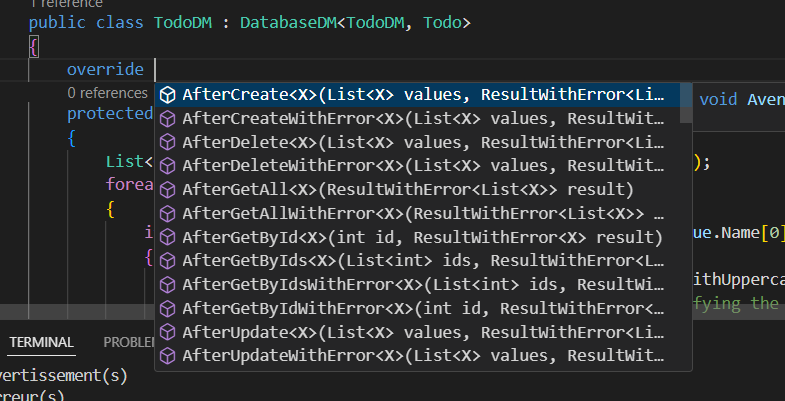
You can view the list of functions you can override by typing override in your class.
Congratulations! You have created the logic to connect your database and models. Now, all that remains is to expose functions so that your frontend can send information to your backend.